
Facebook Ads Library: How to Find, Save & Break Down Winning Ads (2026)
The Facebook Ads Library shows you every active ad your competitors are running across Meta's platforms — Facebook, Instagram, Messenger, and Audience Network. It's free, public, and doesn't require a Facebook account to access.
This guide covers exactly how to use it: from basic searches to advanced filtering techniques that most marketers miss. You'll also learn how to identify winning ads (not just active ones), and a system for turning your research into organized creative intelligence — instead of a graveyard of forgotten screenshots.
TL;DR — Key Takeaways
- The Facebook Ads Library (also called Meta Ads Library) is a free public database of all active ads across Meta platforms. Access it at
facebook.com/ads/library. - You can search by advertiser name, keyword, or topic — and filter by country, platform, media type, language, and impression date.
- Long-running ads are your best proxy for "winning" creatives. If an ad has been active for 30+ days, it's likely meeting the brand's performance benchmarks.
- EU transparency features reveal additional data: estimated audience size, impressions by date, and targeting demographics.
- The biggest limitation: ads disappear when campaigns stop. You need a system to save them permanently.
- Adlude's Chrome extension saves ads with one click — including the video, image, copy, and landing page URL. AI breakdown then deconstructs hook, structure, and conversion logic automatically.
- The real advantage isn't finding ads — it's turning them into structured briefs and scripts your team can act on.
What Is the Facebook Ads Library?
Facebook launched the Ad Library in 2019 as a political advertising transparency tool. The original purpose was simple: let anyone see who was paying for political ads and how much they spent.
Since then, it's evolved into something far more useful for performance marketers. The library now indexes every active ad running across Meta's platforms — not just political content. That means you can search for any brand, any industry, any product, and see exactly what ads they're running right now.
Here's what the Facebook Ads Library gives you:
- Full creative visibility: See the actual ad creative (image, video, carousel), primary text, headline, description, and CTA button for every active ad.
- Multi-platform coverage: Ads running on Facebook, Instagram, Messenger, and Audience Network are all included.
- No account required: Anyone can access the library without logging in (though logging in unlocks some additional filtering).
- EU transparency data: For ads targeting EU countries, you get estimated audience size, impressions by date range, and demographic breakdowns.
- Political ad archives: Political and social issue ads are stored for up to seven years, with spend data included.
What it doesn't give you: historical ads that have stopped running (except political), performance metrics like CTR or ROAS, or the ad's targeting parameters (outside of EU disclosures).
How to Access the Facebook Ads Library
There are two ways to get into the library, depending on your starting point.
Method 1: Direct Access (Recommended)
Go to facebook.com/ads/library. This is the fastest path when you're starting a research session with a specific brand or keyword in mind.
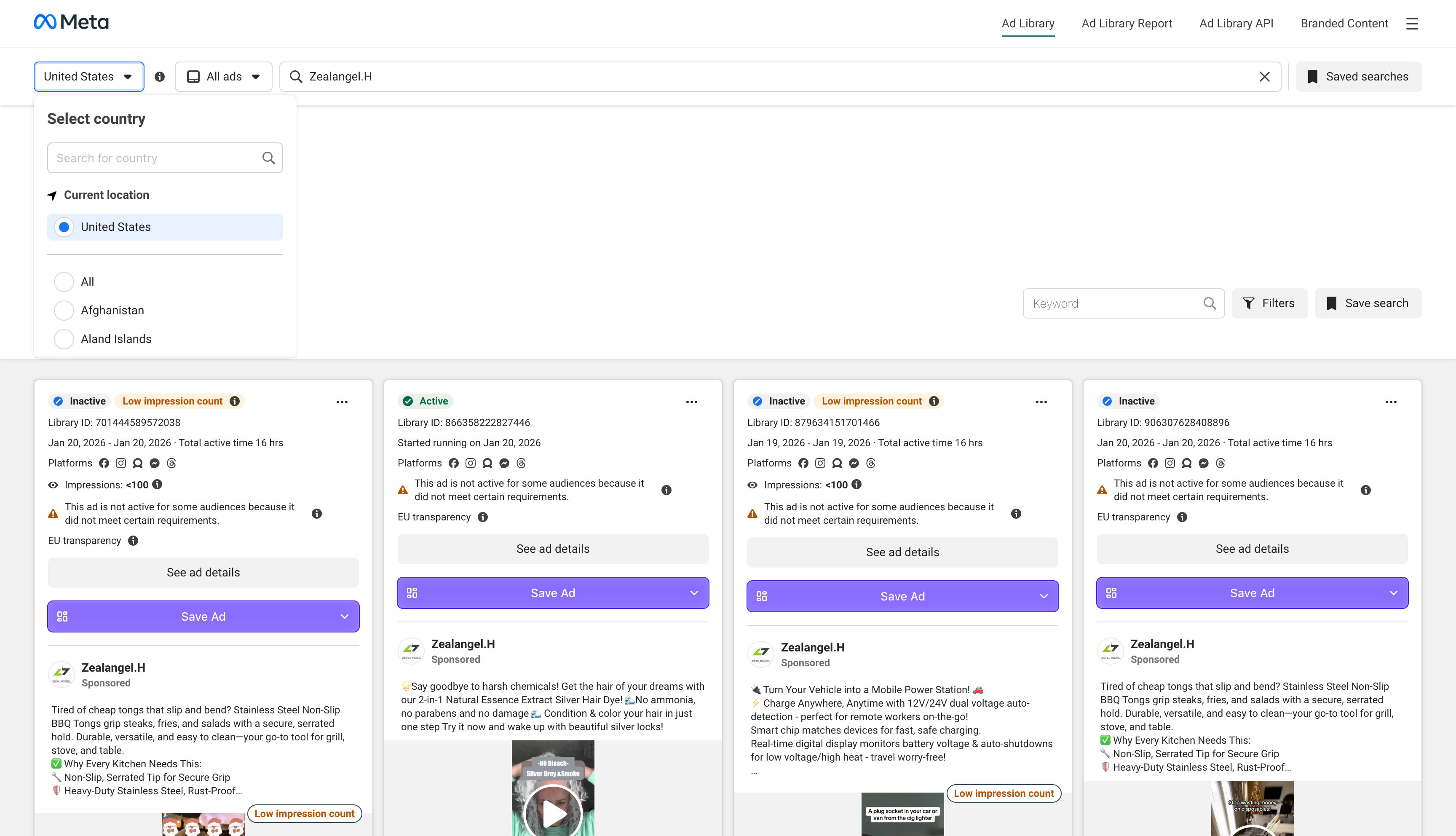
Step-by-step:
- Navigate to
facebook.com/ads/library - Select your target country from the dropdown (or choose "All" for global results)
- Choose an ad category — select "All ads" unless you specifically need political/social issue ads
- Enter the brand name, keyword, or topic in the search bar
- Hit Enter or click the search icon
Pro tip: Log into your Facebook account before searching. While the library works without login, being logged in sometimes surfaces more complete results and enables additional filter options.
Method 2: From a Brand's Facebook Page
This method works well when you're already browsing a competitor's Facebook presence.
- Go to the competitor's Facebook Page
- Click "About" in the left sidebar
- Scroll to "Page Transparency" and click "See All"
- Click "Go to Ad Library"
This takes you directly to that brand's ad library page — showing every ad they're currently running.
Mastering Search & Filters: Find Exactly What You Need
The basic search is useful, but the real power of the Facebook Ads Library lives in its filters. Here's how to use each one strategically.
Filter by Country
The country filter determines which geographic targeting you're researching. If a brand runs different creatives for the US vs. UK vs. Germany, you'll see different results for each country.
Strategic use: Check your top 3 markets separately. Many brands test creative concepts in smaller markets before rolling them to larger ones. Searching Australia or Canada can reveal what's coming to the US next.
Filter by Platform
Options: Facebook, Instagram, Audience Network, Messenger.
Strategic use: Filter to Instagram-only to see what a brand is specifically designing for Stories, Reels, and Feed on IG. These creatives often differ significantly from their Facebook counterparts — shorter copy, different aspect ratios, more trend-driven visuals.
Filter by Media Type
Options: Images, Videos, Memes, No Image or Video.
Strategic use: Filter to Videos to focus on video ad research. Video creatives reveal the most about a brand's messaging strategy — hook patterns, script structures, talent approach, and production quality. This is where the richest competitive intelligence lives.
Filter by Impressions Date
This lets you narrow results to ads that received impressions within a specific date range.
Strategic use: This is the closest thing you have to a "performance filter." Set the date range to the last 90 days. Ads that have been receiving impressions consistently over 90 days are very likely performing well. If a brand is spending money on an ad for three months, it's working.
Filter by Language
Narrows results to ads in a specific language.
Strategic use: Useful for global brands. Filter by your target market's language to see localized creative approaches — not just translations, but culturally adapted messaging.
How to Identify Winning Ads (Not Just Active Ones)
The Facebook Ads Library shows you every active ad — but it doesn't tell you which ones are performing well. Here's how experienced media buyers read between the lines to identify winners.
Signal 1: Run Time Is Your Best Proxy
An ad that's been running for 30+ days is almost certainly meeting the brand's performance benchmarks. Brands don't pay to keep underperforming ads live for months. If you see an ad that's been active for 60-90+ days, treat it as a proven winner.
How to check: Use the "Impressions by Date" filter. Set the start date to 60-90 days ago. If an ad appears in both that date range AND in recent results, it's been running continuously.
Signal 2: Multiple Variations = Active Testing
When a brand runs 5-10 variations of the same concept (same product, different hooks or visuals), they're actively testing that creative angle. The angle itself is what they believe in — the variations are optimization.
What to capture: Don't just save one variation. Save 3-4 and compare the hooks. The differences between variations reveal what variables the brand thinks matter most.
Signal 3: Consistent Format Across Campaigns
If a brand keeps producing new creatives in the same format (e.g., UGC testimonials, side-by-side comparisons, or product demos), that format is working for them. One-off experiments look different from proven playbooks.
Signal 4: Cross-Platform Presence
An ad running on both Facebook and Instagram simultaneously suggests confidence and budget allocation. Brands typically test on one platform first and expand when they see results.
Limitations: What the Facebook Ads Library Can't Do
Let's be direct about the gaps — because understanding them helps you build a better research system.
No historical data for commercial ads. When a brand stops running an ad, it vanishes from the library. That competitor creative you saw last month? Gone. This is the single biggest limitation for research purposes — and the primary reason you need a system to save ads permanently.
No performance metrics. You won't see CTR, conversion rate, ROAS, or spend data for commercial ads. The run-time proxy discussed above is your best workaround.
No targeting data (outside EU). For non-EU ads, you can't see who the ad is targeting — demographics, interests, custom audiences, or lookalikes.
No cross-platform comparison. The library only covers Meta platforms. You'll need to research TikTok, YouTube, Google, and LinkedIn ads through their respective transparency tools — or use a cross-platform search tool like Adlude Discovery to search multiple ad libraries from one interface.
Search is basic. The search function is keyword-based and limited. You can't search by ad concept, visual style, hook type, or creative format in any meaningful way.
Turn Research into Action: The Adlude Workflow
Finding great ads is step one. The step most teams skip is turning that research into structured creative intelligence that directly feeds production.
Here's the workflow that replaces "random browsing → forgotten screenshots" with a repeatable system.
Step 1: Save Ads Permanently with One Click
Install the Adlude Ad Saver Chrome extension. When you're browsing the Facebook Ads Library, a "Save to Adlude" button appears on each ad. One click saves the video/image, ad copy, headline, CTA, and landing page URL to your cloud library. The ad stays in your account forever — even after the original campaign stops running.
Step 2: Organize into a Searchable Swipe File
In Adlude Swipe File, organize saved ads using nested folders (by competitor, campaign, or theme), custom tags, and keyword search. No more digging through Google Drive folders or Slack threads.
Recommended folder structure for competitive research:
/Competitors/[Brand Name]/[Quarter]/Formats/UGC/Formats/Product Demo/Formats/Testimonial/Hooks/Question Hooks/Hooks/Stat Hooks/Hooks/Controversy
Step 3: AI Breakdown — Understand Why It Works
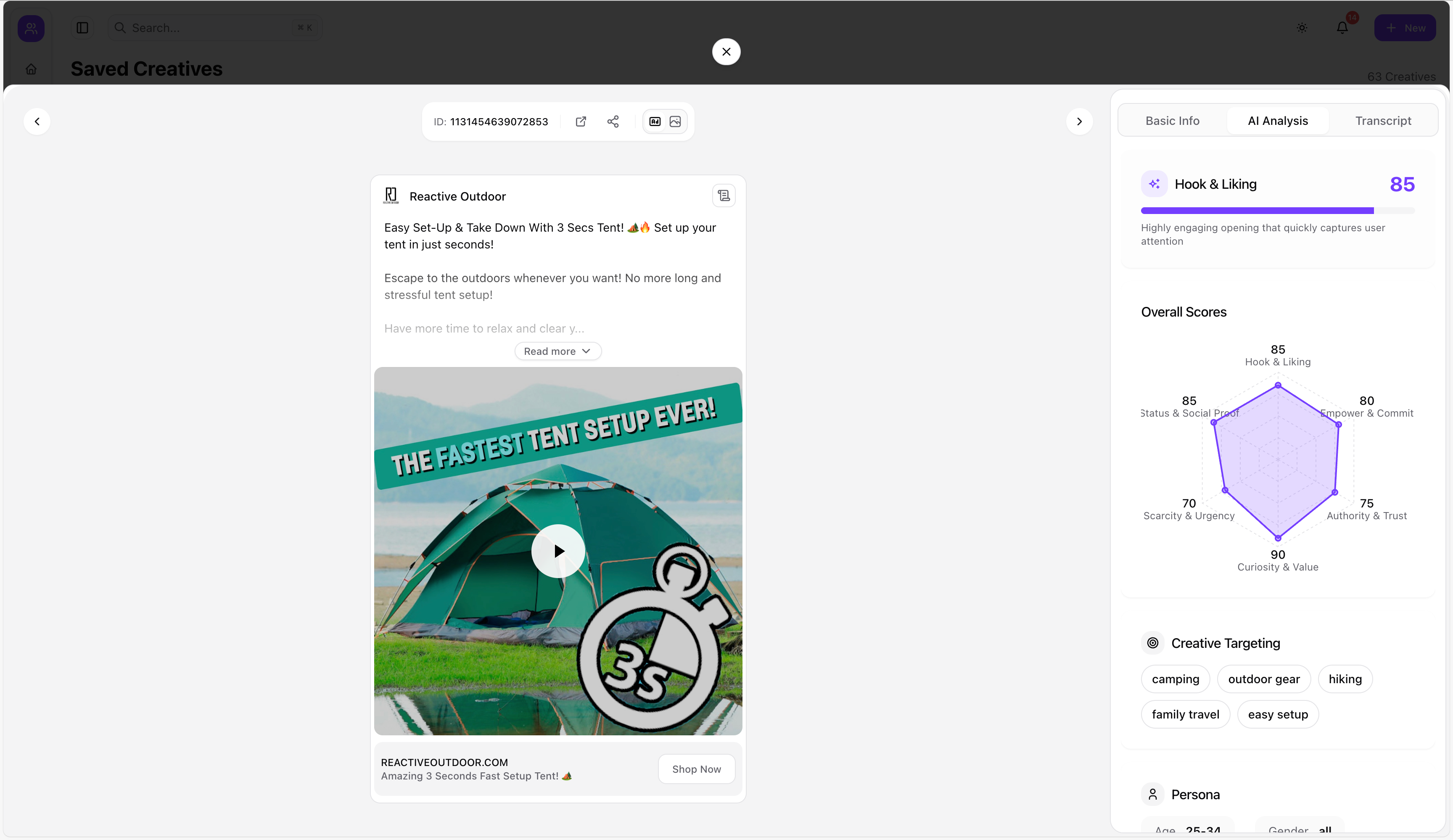
Select any saved ad and run Adlude AI Breakdown. The AI deconstructs the creative into structured elements:
- Hook analysis: What the opening 2-3 seconds do and why they stop the scroll
- Script structure: The narrative framework (problem-agitate-solve, testimonial-led, demo-led, etc.)
- Copy strategy: Headline formula, benefit framing, CTA approach
- Conversion logic: How the ad moves the viewer from attention to action
Step 4: Generate a Production-Ready Script
This is where Adlude diverges from every other research tool. Based on your saved reference ads and your product inputs, Adlude AI Script Generator produces video scripts, creative briefs, and storyboards — ready for your production team.
Use Adlude Brief to link reference ads from your Swipe File, add your brand profile (tone, USPs, visual guidelines), and generate a complete production package: script, storyboard with shot descriptions, and exportable PDF/SRT files.
The whole loop — from finding an ad in the Facebook Ads Library to handing a storyboard to your production team — takes about 15 minutes.
Advanced Techniques: Get More from the Ad Library
Technique 1: Map a Competitor's Full Creative Strategy
Don't just search once. Do a systematic audit:
- Search the brand name with no filters — note the total number of active ads
- Filter by media type — calculate their video vs. image vs. carousel mix
- Filter by platform — see what's running on Instagram vs. Facebook
- Check the "Impressions by Date" for the last 90 days — isolate their long-runners
- Save the top 10 creatives to your Adlude Swipe File for deeper analysis
This gives you a snapshot of their entire creative strategy: format preferences, messaging themes, testing velocity, and winning patterns.
Technique 2: Keyword-Based Concept Search
Instead of searching by brand name, search by product category or benefit claim. For example:
- Search "meal delivery" to see how all meal kit brands are advertising
- Search "anti-aging serum" to see what claims and hooks dominate skincare
- Search "project management" to see B2B SaaS creative approaches
This surfaces competitors you didn't know existed and reveals industry-wide creative trends.
Technique 3: EU Market Deep Dive
For any brand targeting EU countries, switch your country filter to Germany, France, or another EU market. The EU Digital Services Act requires Meta to show additional data:
- Estimated audience reach
- Impression counts by date
- Age and gender demographic breakdowns
- Regions where the ad was shown
This is the closest thing to actual performance data the library provides. Use it to validate which creatives are getting real distribution.
Technique 4: Track Branded Content & Influencer Partnerships
Click "Branded Content" in the top-right corner of the Ad Library. This shows paid creator partnerships — which influencers a brand is working with, across Facebook and Instagram. It's an underused feature that reveals a brand's influencer strategy.
Facebook Ads Library FAQ
Can I use the Facebook Ads Library without a Facebook account?
Yes. The library is publicly accessible without login. However, logging in sometimes surfaces more complete results and enables additional filtering options. For the best research experience, log in with any Facebook account.
How do I find old ads that are no longer running?
For commercial (non-political) ads, you can't — once a campaign stops, the ad is removed from the library. This is why saving ads to a permanent swipe file is critical. Political and social issue ads are archived for up to seven years. For commercial ads, tools like Adlude Swipe File save creatives permanently, even after the original campaign ends.
Can I download videos from the Facebook Ads Library?
Facebook doesn't provide a native download button. You can use browser developer tools (right-click → Inspect → Network tab → filter for video files), but this is clunky and unreliable. The Adlude Ad Saver extension saves videos, images, and copy to your cloud library with one click — no developer tools needed.
How do I tell if a Facebook ad is performing well?
The Ad Library doesn't show performance metrics. Use run time as a proxy: ads active for 30+ days are likely meeting the brand's targets. Also look for multiple variations of the same concept (indicates active testing) and cross-platform presence (indicates confidence and budget).
Is the Facebook Ads Library the same as the Meta Ads Library?
Yes. "Meta Ads Library" and "Facebook Ads Library" refer to the same tool. Meta rebranded, but the URL (facebook.com/ads/library) and functionality remain the same. The library covers all Meta platforms: Facebook, Instagram, Messenger, and Audience Network.
How often is the Facebook Ads Library updated?
The library updates in near real-time. New ads typically appear within 24 hours of launch. However, there can be slight delays for new advertisers or ads under review.
Start Building Your Competitive Intelligence System
The Facebook Ads Library is the most accessible starting point for competitive ad research. But the real advantage isn't in finding ads — it's in what you do after you find them.
Here's your next step: Open the Facebook Ads Library, search for your top competitor, filter to video ads with impressions in the last 90 days, and identify their top 5 longest-running creatives. Then save them to your Adlude Swipe File, run an AI breakdown on each one, and generate a script inspired by the winning pattern you find.
The entire process takes about 15 minutes. The insights you get will inform your next month of creative testing.