

How to Build an Ad Swipe File That Actually Gets Used (2026 Framework)
If you've saved hundreds of ads to a Google Drive folder, a Notion board, or a Slack thread — and never looked at them again — you don't have a swipe file. You have a digital graveyard.
A swipe file only works if it's searchable, organized, and connected to your creative output. This guide gives you a practical framework for building one: what to save, how to organize it, when to review it, and how to turn it into briefs and scripts instead of letting it collect dust.
TL;DR — Key Takeaways
- A swipe file is a curated collection of ad creatives you reference when building new campaigns. It's your creative memory.
- Most swipe files fail because they lack structure. Saving without organizing is the same as not saving.
- The 3-layer system works: Capture → Organize → Activate. Each layer has specific rules.
- Tag by creative angle (not just brand or platform) — this is the difference between a reference library and a useful system.
- Review weekly, not when you "need inspiration." Proactive review drives better creative output than reactive browsing.
- The swipe file should connect directly to your briefing and scripting workflow — not live in isolation.
Why Most Swipe Files Fail
There's a pattern that repeats across every creative team:
Week 1: You discover a brilliant competitor ad. You screenshot it, bookmark the link, or send it to a Slack channel. You feel productive.
Week 4: You need inspiration for a new campaign. You vaguely remember that great ad from a few weeks ago. You dig through your screenshots, bookmarks, or Slack history. You can't find it. Or you find it, but the link is dead because the campaign stopped running.
Week 5: You start the creative process from scratch, reinventing ideas your team has already seen and forgotten.
This cycle happens because saving an ad is not the same as building a system. The three most common failure modes:
Failure Mode 1: No organization taxonomy. Saving 500 ads to a single folder means you have 500 things to scroll through. Without tags, categories, or folders, your collection grows but its usefulness doesn't.
Failure Mode 2: Links break. When you save a Facebook Ads Library link or a TikTok URL, that ad disappears when the campaign ends. Your swipe file fills up with dead links.
Failure Mode 3: No connection to output. The swipe file lives in one tool. Your briefs live in another. Your scripts live in a third. The gap between "inspiration" and "action" never gets closed.
The 3-Layer Swipe File Framework
A functional swipe file operates on three layers. Each layer has specific rules and workflows.
Layer 1: Capture — What to Save and How
Not every ad deserves a spot in your swipe file. Being selective is what separates a useful library from a digital hoarding problem.
Save an ad when it meets at least one of these criteria:
- It stopped you. You were scrolling and something made you pause. That "something" is worth analyzing — even if you can't articulate why yet.
- It's been running 30+ days. Long-running ads are proven performers. The brand is spending money on it because it works.
- It uses a format or hook you haven't tried. Novel approaches expand your creative repertoire. Save them even if they're in a different industry.
- It's from a direct competitor. Your competitive intelligence folder should capture everything significant your competitors test.
- It solves a brief you're currently working on. If you're about to brief a testimonial ad and you see a great testimonial format, save it immediately.
How to capture efficiently:
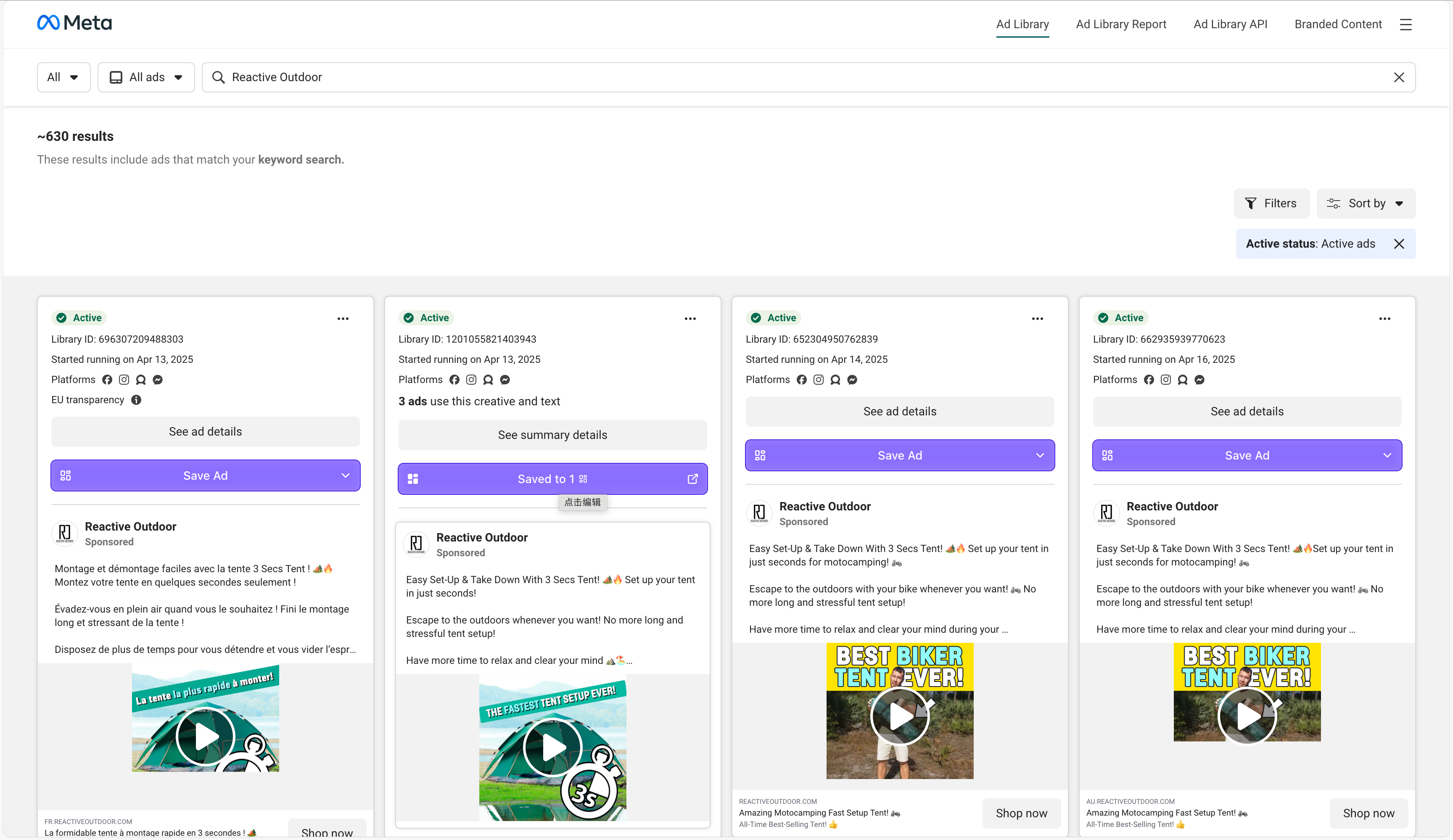
The fastest capture method is a browser extension that saves the full creative (video/image + copy + URL + metadata) to a cloud library. The Adlude Ad Saver extension works across Facebook Ads Library, TikTok Creative Center, LinkedIn, YouTube, and 4+ platforms — one click saves everything permanently.
What to capture beyond the creative:
- The ad copy (primary text, headline, description)
- The landing page URL (and a screenshot of it, if possible)
- The CTA button text
- Your initial note: why you saved it (one sentence)
Layer 2: Organize — The Taxonomy That Makes Retrieval Instant
This is where most swipe files break down. An unorganized collection of 500 ads is less useful than a well-organized collection of 50.
Recommended folder structure:
/By Competitor
  /[Brand A]
  /[Brand B]
  /[Brand C]

/By Format
  /UGC / Creator-led
  /Product Demo
  /Testimonial / Social Proof
  /Before-After / Transformation
  /Explainer / How-It-Works
  /Comparison / Us vs. Them
  /Lifestyle / Aspirational
  /Static / Image Ads

/By Hook Type
  /Question Hooks
  /Statistic / Data Hooks
  /Controversy / Hot Take
  /Problem Statement
  /Curiosity Gap
  /Before-After Visual

/By Campaign Theme
  /[Current Campaign A]
  /[Current Campaign B]
Tagging rules:
Tags are your cross-referencing system. An ad can live in one folder but have multiple tags. Recommended tag categories:
- Platform:
#facebook#tiktok#instagram#youtube#linkedin - Industry:
#ecommerce#saas#finance#beauty#realestate - Creative angle:
#social-proof#urgency#educational#emotional#humor - Funnel stage:
#tofu#mofu#bofu#retargeting - Performance signal:
#long-running#many-variations#high-spend
In Adlude Swipe File, you can create custom tags and use combined filters to find exactly what you need. Search "UGC + beauty + tiktok + long-running" and instantly see every proven UGC beauty ad from TikTok in your collection.
Layer 3: Activate — Connect Inspiration to Production
This is the layer that 90% of creative teams skip entirely. Your swipe file should not be a passive library — it should be an active input to your creative production process.
Weekly review cadence:
Block 30 minutes every Monday morning (or your sprint planning day) to:
- Review new saves from the past week (5 minutes)
- Tag and organize any untagged items (5 minutes)
- Identify 2-3 ads relevant to your current campaign priorities (10 minutes)
- Run AI breakdowns on those 2-3 ads to extract structured insights (5 minutes)
- Add reference links to your current creative briefs (5 minutes)
Connecting to briefs and scripts:
The gap between "I saved a great ad" and "My team produced something inspired by it" is a brief. Every reference ad should link to a brief that translates the inspiration into direction.
In Adlude Brief, you can link any saved ad as a creative reference. The AI Script Generator then produces scripts and storyboards that reference the winning patterns from your saved ads — while adapting them to your brand voice and product.
This is the complete loop: Find → Save → Organize → Analyze → Brief → Script → Produce.
Swipe File Templates: 3 Systems for Different Team Sizes
Solo Marketer / Freelancer
Keep it simple. One folder per client, tags for format type, weekly 15-minute review.
- Folders:
/Client A/Client B/Personal Inspiration - Tags:
#video#static#carousel+ platform tags - Review cadence: 15 minutes every Monday
- Goal: 5-10 new saves per week, activate 2-3 per sprint
In-House Team (3-10 people)
Shared library with per-project folders. Creative strategist owns organization, team contributes saves.
- Folders: By competitor + by campaign + by format
- Tags: Full taxonomy (platform, industry, angle, funnel stage)
- Review cadence: 30 minutes at sprint planning, 15 minutes mid-week
- Collaboration: Shared Adlude workspace. Team members save; strategist organizes and briefs.
- Goal: 20-30 new saves per week, activate 5-8 per sprint
Agency (Multiple Clients)
Per-client workspaces with standardized folder structure replicated across each client.
- Folders: Same template for every client: Competitors / Formats / Hooks / Current Campaigns
- Tags: Client-specific tags + global format/angle tags
- Review cadence: Per-client sprint planning + cross-client monthly trend review
- Collaboration: Account managers save competitive intel; creative strategists organize and brief.
- Goal: 10-15 saves per client per week
5 Common Swipe File Mistakes (And How to Fix Them)
Mistake 1: Saving everything. If you save every ad you see, your library becomes noise. Be selective. Apply the "save criteria" from Layer 1.
Mistake 2: Organizing by brand only. Brand-only folders make it easy to study one competitor but impossible to search by creative concept. Use the dual system: folders for brands, tags for concepts.
Mistake 3: Never deleting. A swipe file needs pruning. Every quarter, archive or delete ads that are no longer relevant — outdated formats, expired offers, or creatives from markets you no longer target.
Mistake 4: Individual silos. When team members maintain personal swipe files (their own bookmarks, their own Google Drive), the team's collective intelligence is fragmented. Centralize in a shared workspace.
Mistake 5: No activation loop. The biggest mistake. Saving ads without connecting them to briefs, scripts, and production is just organized procrastination. Every saved ad should have a potential path to action.
Swipe File FAQ
How many ads should a good swipe file contain?
Quality over quantity. A well-organized swipe file with 100-200 highly relevant ads is more useful than 2,000 random saves. Focus on maintaining a curated collection — add selectively, prune quarterly.
Should I organize by platform, brand, or creative concept?
Use all three — that's why tags exist. Folders handle the primary axis (usually by brand or project), and tags handle the secondary axes (platform, creative angle, hook type, funnel stage). This gives you multiple retrieval paths.
How do I keep my swipe file from becoming stale?
Set a weekly capture + review cadence. Add 5-10 new ads per week. Review and tag them during your Monday sprint planning. Every quarter, archive ads older than 6 months unless they're evergreen reference material.
What's the difference between a swipe file and an ad library tool?
An ad library (like Facebook Ads Library or Adlude Discovery) is a searchable database of public ads. A swipe file is your personal curated collection of ads you've chosen to save for reference. The best workflow uses both: discover ads in the library, save the best to your swipe file.
Can I share my swipe file with clients?
Yes. In Adlude Swipe File, you can generate share links with password protection, expiry dates, and download controls. Clients see the curated collection without needing an Adlude account.
Build a Swipe File You Actually Use
The difference between a dead swipe file and a living one is structure. Capture selectively, organize with a clear taxonomy, and — most importantly — connect your saved ads to your briefing and scripting workflow.
Start today: Pick your top 3 competitors, open the Facebook Ads Library, and save their 5 longest-running ads each to your Adlude Swipe File. Tag them by format and hook type. Then run an AI breakdown on the one that impresses you most.
That's 15 minutes. And you'll have more structured creative intelligence than most teams build in a week.