
Track Competitor Ads Automatically: Alerts, Changes & Daily Intel (2026 Guide)
Your competitors launched 12 new creatives this week. Three of them are variations on a new hook angle. One is driving traffic to a landing page you've never seen. You should know about all of this before they scale the winners — not after.
Competitor ad monitoring isn't about copying. It's about reading the market in real time: what messaging is being tested, which creative formats are gaining traction, and where the industry is shifting before it becomes obvious.
This guide covers what to monitor, how to set up a system that runs itself, and how to turn competitive intelligence into creative action.
TL;DR — Key Takeaways
- Manual competitor checks (browsing the Facebook Ads Library weekly) miss new launches, short-lived tests, and pattern changes.
- Automated tracking captures every new creative in real time and surfaces trends you'd miss manually.
- Track 5-10 competitors: 3-4 direct competitors + 2-3 aspirational brands or category leaders.
- The four things worth monitoring: new creative launches, hook patterns, landing pages, and format/media mix changes.
- Build a "competitor intel digest" — a weekly summary of competitive moves that feeds into your creative sprint planning.
- The goal isn't surveillance. It's pattern recognition: spotting what the market is testing and deciding what's worth adapting.
Why Manual Monitoring Fails
Most teams check competitor ads when they remember to — usually during sprint planning or when they're stuck for ideas. Here's what this approach misses:
Short-lived tests. Brands often test new creative concepts for 3-7 days. If you check weekly, you miss the experiment entirely. By the time you see the scaled version, you've lost 2-3 weeks of strategic lead time.
Launch velocity changes. If a competitor suddenly jumps from 5 new creatives per week to 20, that's a signal — they might be gearing up for a seasonal push, testing a new product line, or responding to performance pressure. You won't catch this without consistent tracking.
Landing page rotations. Competitors often test different landing pages alongside their creative tests. The same ad driving traffic to a new offer page or updated pricing reveals strategic shifts you can't see from the ad alone.
What to Track: The 4 Intelligence Layers
Layer 1: New Creative Launches
The most basic signal: what new ads did each competitor launch this week?
What to look for:
- Volume changes (more launches = more aggressive testing or new campaign)
- Format shifts (moving from static to video, or vice versa)
- New concepts vs. iterations on existing concepts
Layer 2: Hook Patterns & Messaging Angles
Beyond individual ads, track the patterns. When a competitor tests 5 new ads with the same opening hook structure, they're betting on that approach.
What to look for:
- Recurring hook types (questions, statistics, controversy, demonstrations)
- New messaging angles (pain points they haven't addressed before)
- Hook longevity — hooks that keep appearing in new creatives are proven winners
Adlude Spyer includes a Trending Hooks Tracker that sorts all opening hooks by run time. Long-running hooks are proven high-converters — they're the patterns most worth studying and adapting.
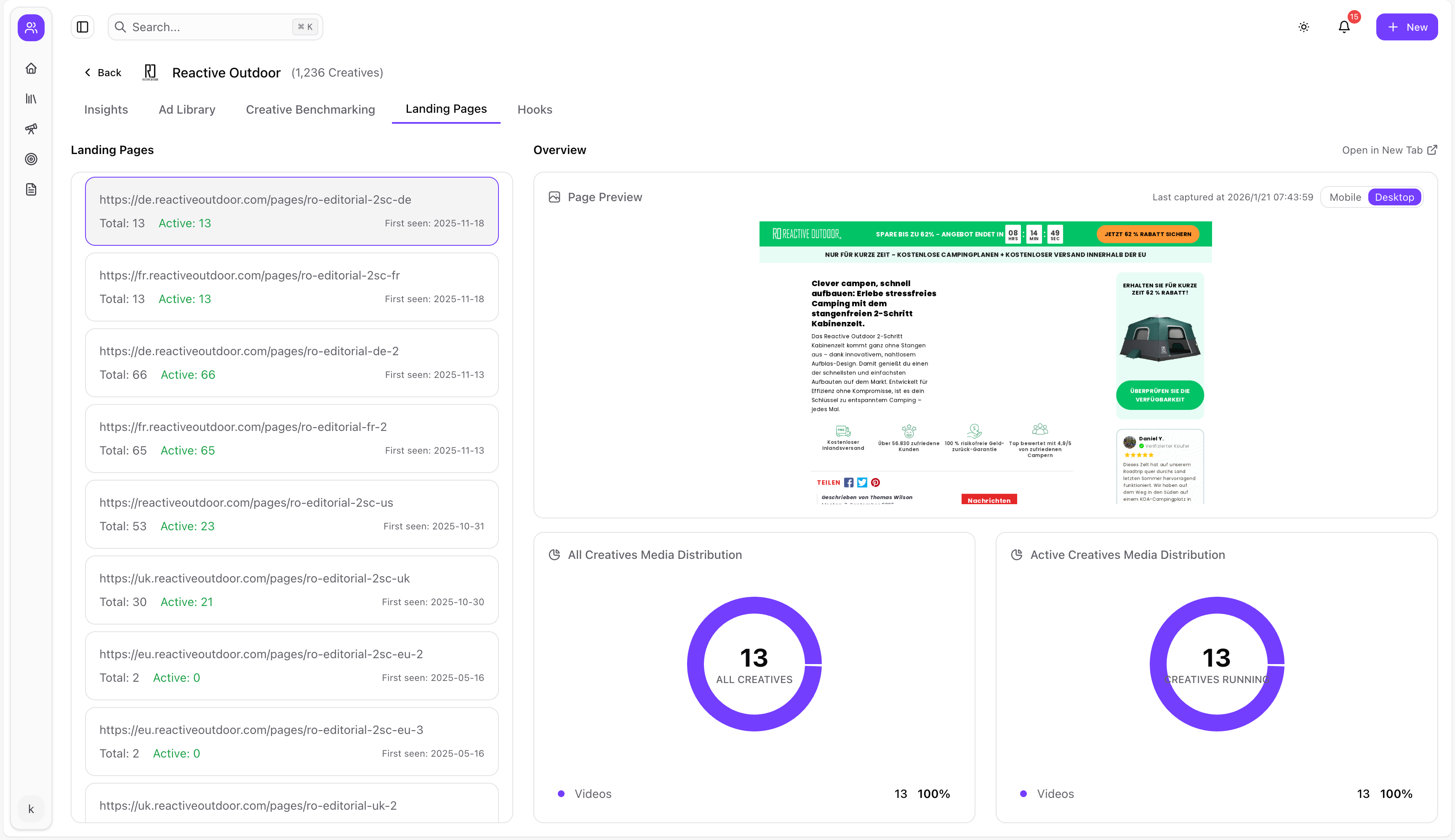
Layer 3: Landing Page Intelligence
The ad is half the story. Where is the traffic going?
What to look for:
- New landing pages (new product launches, new offers, new positioning)
- Landing page design changes (updated hero sections, new social proof, changed pricing)
- Traffic distribution — which landing pages get the most ad volume?
Layer 4: Media Mix & Format Distribution
Track the overall creative strategy, not just individual ads.
What to look for:
- Video vs. image vs. carousel distribution — and how it shifts over time
- New format experiments (short-form vertical video, carousel storytelling, creator partnerships)
- Platform distribution (what percentage of their ads run on Instagram vs. Facebook?)
Setting Up Your Monitoring System
Step 1: Choose Your 5-10 Brands to Track
- 3-4 direct competitors — Brands selling similar products to similar audiences
- 2-3 aspirational brands — Category leaders or brands known for exceptional creative
- 1-2 adjacent-industry brands — Brands in related verticals whose creative approach you admire
Step 2: Set Up Automated Tracking
In Adlude Spyer, paste the Facebook Ads Library URL for each brand you want to track. The system automatically:
- Saves all currently active ads
- Scans daily for new creative launches
- Sends in-app and email alerts when new ads are detected
- Tracks creative lifecycle (launch date, run time, active/paused status)
Step 3: Configure Alert Thresholds
Not every new ad needs your attention. Configure alerts to focus on what matters:
- New creative volume alerts: Get notified when a brand launches 5+ new ads in a day (signals a new campaign push)
- Long-running ad alerts: Get notified when an ad passes the 30-day or 60-day mark (signals a proven winner)
- Format change alerts: Get notified when a brand's media mix shifts significantly
Step 4: Build Your Weekly Intel Digest
Every Monday (or your sprint planning day), compile a 10-minute competitive brief:
- New launches: How many new creatives did each tracked brand launch? Any surprising volumes?
- Winning signals: Which competitor ads just passed the 30-day mark? These are newly confirmed winners.
- Hook trends: Any new hook patterns appearing across multiple competitors?
- Landing page changes: Any new offers, pricing changes, or positioning shifts?
- Action items: 2-3 insights that should inform this week's creative briefs
From Intelligence to Action: Using Competitor Insights
The point of monitoring isn't to build a dossier. It's to make better creative decisions faster.
Pattern worth testing: A competitor launches 5 UGC-style ads in one week after running polished produced ads for months. This suggests their data shows UGC is outperforming. Consider testing a similar format shift.
Hook worth adapting: A competitor's ad has been running for 60+ days with a "Did you know..." opening hook. The hook structure is proven — adapt it with your product's data point and test it.
Offer worth considering: A competitor shifts all ad traffic from their homepage to a new comparison landing page. This suggests the comparison angle is converting better. Consider building your own comparison page.
Save the most insightful competitor ads to your Adlude Swipe File, run AI breakdowns to understand their structure, and feed those patterns directly into your creative briefs using Adlude Brief.
Competitor Ad Monitoring FAQ
How many competitors should I track?
5-10 is the practical range. Fewer than 5 gives you a narrow view. More than 10 creates information overload. Start with your 3 closest competitors and add from there.
Can I see competitor ad spend or ROAS?
No tool can reliably show you a competitor's ad spend or ROAS. What you can infer: long run times suggest positive ROI, high creative volume suggests significant budget allocation, and multiple variations suggest active optimization.
How often should I review competitor ads?
Quick daily scan (2-3 minutes) of new launch alerts. Deep weekly review (15-20 minutes) for pattern analysis and creative brief inputs. Monthly strategic review (30-60 minutes) to assess competitive positioning shifts.
Is competitor ad tracking ethical?
Competitor ad monitoring uses publicly available data from platform transparency tools (Facebook Ads Library, etc.). These tools exist specifically for transparency purposes. Monitoring is standard practice — copying ads is not. Use competitive intelligence to inform your creative direction, not to replicate someone else's work.
Start Tracking Before Your Competitors Scale
The best time to see a competitor's new creative direction is when they're testing it — not when they've scaled it to every audience segment.
Set up tracking today: Pick your top 3 competitors, add them to Adlude Spyer, and check the alerts Wednesday morning. You'll have competitive intelligence that would have taken 2 hours of manual browsing — delivered in 5 minutes.